Figure Object
Ensure root units are pixels
set(0,'Units','pixels')
Note: 0: root--->Computer Screen
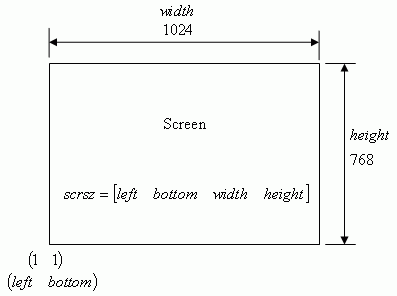
To get the screen size:
scrsz = get(0,'ScreenSize')
scrsz is a four-element vector: [left, bottom, width, height]for example: scrsz=[1 1 1024 768]
figure('Position',[scrsz(3)/4 scrsz(4)/6 scrsz(3)/3 scrsz(4)/2])
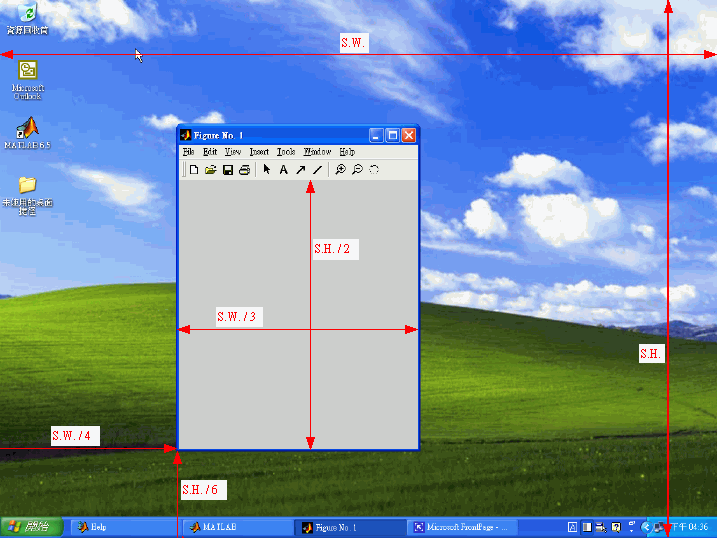
figure('Position',[scrsz(3)/4 scrsz(4)/6 scrsz(3)/3 scrsz(4)/2],'MenuBar','none')

figure('PropertyName',PropertyValue,...) creates a new figure object using the values of the properties specified.
MATLAB uses default values for any properties that you do not explicitly define as arguments.
h=figure('PropertyName',PropertyValue,...)h = figure('PropertyName',PropertyValue,...) returns the handle to the figure object.
figure(h)
figure(h) does one of two things, depending on whether or not a figure with handle h exists. If h is the handle to an existing figure, figure(h) makes the figure identified by h the current figure, makes it visible, and raises it above all other figures on the screen. The current figure is the target for graphics output. If h is not the handle to an existing figure, but is an integer, figure(h) creates a figure, and assigns it the handle h. figure(h) where h is not the handle to a figure, and is not an integer, is an error.
set(h,'PropertyName',PropertyValue,...)
set(h,'PropertyName',PropertyValue,...) sets the named properties to the specified values on the object(s) identified by h. h can be a vector of handles, in which case set sets the properties' values for all the objects.
h = gcf
h = gcf returns the handle of the current figure. The current figure is the figure window in which graphics commands such as plot, title, and surf draw their results. If no figure exists, MATLAB creates one and returns its handle.
If you do not want MATLAB to create a figure if one does not already exist, you can use the statement:
get(0,'CurrentFigure')